


A reliable internet connection has become essential to everyday life. Households use Wi-Fi for video calls, online education, streaming entertainment, gaming, smart home devices, and countless other activities.
Yet even a fast internet plan can feel frustrating when the wireless signal is weak in certain rooms or the connection becomes unstable during busy periods.
The good news is that many common Wi-Fi problems can be improved by understanding how home networks operate and making a few practical changes. In some situations, upgrading the networking equipment may also be worthwhile.
Understand the Difference Between Internet Speed and Wi-Fi Coverage
Internet speed and wireless coverage are related, but they are not the same thing.
Your internet service determines the connection available from your provider. Wi-Fi distributes that connection wirelessly throughout your home.
If your provider delivers limited bandwidth, replacing the router alone will not necessarily increase the speed of your internet plan. However, a better-positioned or more capable router may improve wireless performance in areas where the existing signal is weak.
Likewise, a fast connection near the router may become slower in distant rooms because of walls, floors, interference, or the distance between devices and networking equipment.
Before purchasing new hardware, test your connection in several locations. Comparing results near the router with results in problem areas can help identify whether the main issue involves the internet service or wireless coverage.
Place Your Router in a Better Location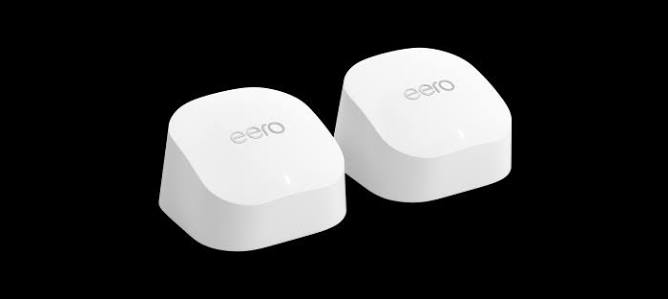
Router placement can have a substantial effect on Wi-Fi performance.
A router hidden inside a cabinet or positioned behind large objects may provide weaker coverage than one placed in an open, central location.
Whenever practical, position the router away from thick walls, large metal objects, and sources of wireless interference. Keeping it elevated rather than placing it directly on the floor may also help distribute the signal.
The ideal location depends on the layout of your home. A router positioned at one end of a long house may provide excellent coverage nearby but struggle to reach rooms at the opposite end.
If possible, place the equipment where it can serve the areas used most frequently.
When a Mesh Wi-Fi System Makes Sense
Traditional routers can provide adequate coverage in smaller homes, but larger or unusually shaped properties may have areas where the signal becomes unreliable.
Mesh Wi-Fi systems use multiple coordinated units to distribute wireless coverage across a property. One unit connects to the internet source, while additional units extend the network into other areas.
This arrangement can help reduce dead zones when the units are positioned appropriately.
However, mesh networking is not automatically the best choice for every household. A well-placed conventional router may be sufficient for a smaller apartment, while a large property with several floors may benefit from additional access points.
Products from eero include mesh Wi-Fi systems designed to help extend home network coverage, making the brand worth investigating when evaluating options for larger or more challenging spaces.
Choosing the Right Wi-Fi Equipment
Wireless networking standards and hardware capabilities continue to evolve. When choosing equipment, consider the number of connected devices, the size of your home, your internet plan, and the types of activities you perform online.
A household that mainly browses websites and streams occasional videos may have different requirements from one that regularly hosts video conferences, downloads large files, and plays online games.
Check whether a router supports your internet service, the wireless bands and standards your devices use, and the number of wired connections you need.
Compatibility with your existing equipment is important. Some networking features require compatible devices, while certain mesh systems work best when their units belong to the same product family.
Reducing Wi-Fi Congestion
Wireless networks share radio frequencies with other nearby networks and devices. In apartment buildings and crowded neighborhoods, congestion can contribute to inconsistent performance.
Modern routers may offer automatic channel selection, band steering, or other features intended to manage wireless traffic.
Where available, connecting devices to an appropriate frequency band can also help. The 2.4 GHz band generally provides greater reach and better penetration through some obstacles, while 5 GHz and 6 GHz can offer higher performance under suitable conditions but may have shorter effective ranges.
Actual results depend on the equipment, interference, building materials, and local wireless environment.
For stationary devices such as desktop computers, televisions, or gaming consoles, Ethernet may provide a more consistent connection than Wi-Fi when a suitable cable can be installed.
Supporting Remote Work and Video Calls
Remote work depends on a stable connection for meetings, document sharing, cloud applications, and collaboration tools.
If video calls repeatedly freeze or disconnect, begin by testing the connection where you work. Check whether the problem occurs on one device or across the entire household.
Closing unnecessary downloads and reducing competing network activity may help during important meetings.
If your workspace is far from the router, consider relocating the router, adding a compatible access point, or using a mesh system. A wired Ethernet connection can also be a strong option when practical.
Remember that connection quality depends on both download and upload performance. Video calls and file sharing may require dependable upload speeds as well as adequate downloads.
Making Online Gaming More Consistent
Online gaming can be sensitive to latency, jitter, and packet loss. These factors influence how quickly game actions are communicated and how consistently the connection behaves.
A fast download speed does not automatically guarantee low latency. The route between your device and the game server, network congestion, and wireless interference can all influence performance.
If possible, connect a gaming console or computer through Ethernet. If wireless connectivity is necessary, place the device where it receives a strong signal and avoid unnecessary network congestion.
Also check whether other applications are downloading large files or streaming high-resolution video during gaming sessions.
Router quality can matter, but upgrading equipment will not eliminate every problem if the underlying issue lies with the internet provider or distant game servers.
Securing Your Home Network
A reliable network should also be secure.
Change default administrative credentials where necessary, use a strong Wi-Fi password, and enable modern security settings supported by your equipment.
Keep router firmware updated to address known vulnerabilities and improve reliability. If your router offers a guest network, consider using it for visitors rather than sharing access to your primary network.
Smart home devices may also benefit from network separation where the router supports appropriate guest or IoT features.
Before purchasing a router, review its update policy, privacy practices, and the features available without a paid subscription.
Should You Upgrade Your Internet Plan?
Sometimes, the problem is not Wi-Fi coverage but insufficient internet capacity.
If several people simultaneously stream video, attend meetings, play games, and download large files, the household may require more bandwidth than the current plan provides.
However, upgrading the plan will not necessarily fix weak wireless coverage. A useful first step is to test the connection near the router using a reliable device and, where possible, a wired connection.
If the wired connection performs well but distant Wi-Fi devices struggle, focus on coverage. If performance is consistently poor even through Ethernet, contact your provider and investigate the service before investing in new networking hardware.
Conclusion
Improving home Wi-Fi starts with identifying the actual problem. Router placement, network congestion, device compatibility, and household bandwidth requirements all influence performance.
For larger homes or properties with persistent dead zones, exploring eero and other mesh networking options may help you determine whether additional coverage equipment is appropriate.
With the right combination of placement, security, and suitable hardware, a home network can provide a more reliable foundation for streaming, gaming, remote work, and connected living.